Student




Frequently Asked Questions
A – ENROLLMENT
1 – How do I complete my enrollment at the University?
Enrollment dates and other information for students placed in the University’s academic programs through ÖSYM are published annually in the Announcements section of the University website.
Students who complete their enrollment through the e-Government portal do not need to visit the University in person or submit any documents. Only students who are unable to enroll through the e-Government portal—including those who graduated from high school before 2008—must visit the University during the announced enrollment period and present the original copies of their high school diploma and identification document.
In documented extraordinary circumstances, such as a serious illness, accident, or natural disaster, enrollment may be completed by an authorized representative holding a notarized power of attorney.
Guide to University Enrollment Through the e-Government Portal
2 – How do I enroll at the University through TR-YÖS?
If you have taken the TR-YÖS exam, applied to the University, and been granted the right to enroll, you must visit the University during the announced enrollment period and submit the required documents to complete your enrollment in person.
Detailed information about international student admission is published annually in the Announcements section of the University website. You may also consult the International Student Admission Criteria page.
B – STUDENT RECORDS AND DOCUMENTS
1 – What is an Enrollment Verification (Student Certificate), and how can I obtain one?
An enrollment verification is an official document confirming that an individual is currently enrolled at the University and is entitled to exercise student rights and privileges.
Students may obtain an enrollment verification through the e-Government portal, using their e-Government credentials, or by applying in person to the Student Affairs Office of their college or school.
A document prepared in response to an in-person request may be released only to the student. In exceptional circumstances, it may be released to an authorized representative holding a notarized power of attorney.
Guide to Obtaining an Enrollment Verification Through the e-Government Portal
2 – How can I obtain my student ID card?
Once enrollment is complete, students receive an ID card identifying them as University of Health Sciences students. Student ID cards are checked when students enter dining halls, use library services, and take exams.
After submitting a student ID card application, students may collect their cards from the Student Affairs Office of their college or school within 15 days.
Student ID Card Application Guide
3 – How can I access University dining halls?
You may enter University dining halls by using your student ID card or by scanning the QR code at the entrance through the SoliClub application.
To use your student ID card, you must first add funds to the card. Please refer to the guide below:
Guide to Adding Funds to a Student ID Card
To enter by scanning a QR code through the SoliClub application, first install the application on your phone and add your card information. Please refer to the guide below:
Guide to Installing the SoliClub Application and Adding a Card
4 – What should I do if I lose my student ID card?
Call the VakıfBank Customer Contact Center at 444 0 724 to deactivate your lost student ID card. You may then apply for a replacement card by following the student ID card application procedure described above.
5 – How can I update my address, phone number, or email address?
Students’ personal information—including their mailing address, home address, phone number, emergency contact information, and other relevant details—is entered into the system during initial enrollment. International students enter their own contact information in the Student Information System (SIS).
If any of this information changes, you can update it through the SIS. Please keep your contact information in the system current at all times.
6 – What should I do if I forget my Student Information System password?
On the Student Information System login page, select “Forgot/Reset Password” and enter the requested information to create a new password. You may also sign in through the e-Government portal by selecting “Log in with e-Government.”
7 – How can I find my student email address?
After you enroll at the University, your student email address is created at the beginning of the academic year in the following format: studentnumber@ogrenci.sbu.edu.tr
8 – What should I do if I forget my student email password?
To receive a new student email password, send the text “sbusifre” to 7889. If you do not receive your password by text message, contact kep@sbu.edu.tr and provide your student ID number and phone number.
9 – How can I connect to the University WiFi network?
Turn on Wi-Fi on your device and select the eduroam network. Enter your student email address as your username and your student email password as your password.
On Android devices, you may also be prompted to select a Certificate Authority (CA) certificate. Select the validation option to connect. If you are unable to connect, contact wifi.destek@sbu.edu.tr
10 – What does an academic advisor do?
Before the beginning of each academic year, the relevant academic unit’s executive board appoints academic advisors from among the faculty members of the student’s department, based on the recommendation of the Department Chair. Academic advisors help students address questions and problems related to their courses and other academic matters.
11 – When is course registration and renewal held?
Course registration and renewal dates are announced on the University website in accordance with the academic calendar before the beginning of each semester. The registration period generally takes place during the week before classes begin.
12 – Can I complete course registration without coming to campus?
Yes. You can complete course registration through the Student Information System (SIS) without coming to campus. Sign in with your username and password or through the e-Government portal, and then select “Course Registration” from the menu. If you are required to pay tuition, you must first make the payment through the “Online Tuition Payment” section of the same menu.
13 – What happens if I miss the course registration dates?
A student who does not complete course registration within the dates specified in the academic calendar may not attend classes, take exams, obtain an enrollment verification, or exercise other student rights during that semester.
Students with a valid, documented reason may apply to the Student Affairs Office of their college or school during the authorized late-registration period specified in the academic calendar. If the request is approved, the student may complete course registration.
14 – Will my enrollment be canceled if I do not renew my course registration?
Your enrollment will not be canceled if you fail to register for courses for one semester. However, each semester in which you do not renew your course registration counts toward your maximum period of study. If you reach the maximum period of study and/or fail to pay tuition and renew your course registration for four consecutive semesters, your enrollment at the University will be terminated.
15 – Can I take a leave of absence?
Students may apply for a leave of absence for documented health-related, military service, family, personal, academic, study-abroad, or other unexpected and compelling circumstances that the relevant executive board recognizes as valid.
Newly admitted students may apply for a leave of absence only after completing their initial enrollment at the University.
C – ACADEMICS
1 – When is the midterm exam schedule announced?
The dates of midterm exams for all courses are announced by the relevant Faculty Dean's Office via the website; they are also posted on announcement boards.
2 – When is the final exam schedule announced?
Final exam dates are held on the dates specified in the Academic Calendar. Final exams will be included in the Academic Calendar at the beginning of the academic year.
3 – When are course schedules announced?
Course schedules are announced on the final day of course registration, before classes begin each semester.
4 – What is the maximum period of study at the University?
The maximum period of study is four years for two-year associate degree programs, seven years for four-year bachelor’s degree programs, eight years for five-year programs, and nine years for six-year programs.
5 – Does the University offer exchange programs?
Yes. Click Here for Information About OAIU and Exchange Programs...
D – COURSES AND GRADES
1 – What Is the Semester Grade Point Average?
To calculate the semester grade point average (SGPA), the grade points earned in each course or academic activity are multiplied by the corresponding credit values. The resulting totals are added together and divided by the total number of credits attempted during the semester.
2 – What Is the Cumulative Grade Point Average?
The cumulative grade point average (CGPA) is calculated using the same method as the SGPA but includes all courses and academic activities taken since the student first enrolled at the University.
3 – Can I retake courses I have previously taken?
The course load a student may take in a semester cannot exceed a total of 30 ECTS credits. Students are required to register first for courses they have failed and courses they have not previously taken from lower semesters. These courses are offered starting from the lower semesters; courses that have been removed from the curriculum and are not offered are replaced by other designated courses. A student who wishes to raise their CGPA may retake courses they have previously taken. When calculating the CGPA, the most recent grade obtained by the student for these courses is valid.
4 – As a first-year student, do I need to register for courses?
Yes. After completing your initial enrollment, you must register for your courses through the Student Information System (SIS) during the course registration period for each semester.
5 – Is attendance at courses compulsory?
Yes. Attendance is required. Students must attend at least 70% of theoretical courses taken for the first time or repeated because of insufficient attendance, and at least 80% of practical courses, laboratory sessions, and similar academic activities.
6 – Under what circumstances may a student’s enrollment be terminated?
a) Cancellation of the registration due to the determination that the final registration was not properly completed or that the right to final registration was not obtained.
b) Receiving a dismissal from the University from the University pursuant to the Higher Education Institutions Student Disciplinary Regulation.
c) If the student wishes to withdraw from the University upon written application and of their own volition, their registration is cancelled.
ç) The registrations of students who fail to pay tuition fees and do not renew their registration for 2 consecutive years are cancelled.
d) The registrations of students who are unable to graduate from the preparatory program within the 2-year preparatory period are cancelled.
e) The registrations of students who fail to submit the documents required at registration and who do not submit their missing documents within the document submission period (by December 31 of the relevant registration year) are cancelled.
f) If deemed appropriate by the University Executive Board.
7 – How can I receive transfer credit or a course exemption for prior coursework?
Students may request a course exemption for equivalent courses successfully completed in a previous degree program at the same academic level. The request must be submitted to the relevant academic unit within 10 business days after enrollment and must include a written request identifying the courses, course descriptions, and an official transcript. The relevant executive board evaluates the request, and the student is notified of the decision in writing within 15 business days.
E – LATERAL TRANSFER
1 – How can I apply for a lateral transfer?
You can make your lateral transfer applications online through our Lateral Transfer Management System. In addition, other detailed information regarding lateral transfer is shared every year in the announcements section of our University's website.
2 – Between what dates can I apply for a lateral transfer?
You can submit your applications between the application dates specified in the announcements section of our University's website.
3 – How many types of lateral transfer applications are there?
There are two types: Academic Achievement-Based Transfer and Central Placement-Based Transfer. Achievement-Based lateral transfers have three subtypes: Intra-Institutional, Inter-Institutional, and International.
4 – How can I log into the system?
To log into the system, you must first register in the system. Once you have registered, you can log into the system with your e-mail address and password.
5 – I cannot log in even though I click Login?
Make sure you have entered your e-mail address and password correctly when you registered in the system.
6 – Where can I register in the system?
You can register by clicking the "New Registration" button on the login page of the Lateral Transfer Management System.
7 – Why is the New Registration button not visible to me?
The New Registration button is active only during the application dates.
8 – How can I register in the system?
After clicking the New Registration button, you need to fill in the required information and select Submit.
9 – How can I submit an application?
After logging into the system, you can complete your application through the following steps: Personal Information, Photo Upload, Contact Information, Educational Information, Document Upload, Applications, and Information Viewing.
10 – What should I pay attention to when submitting an application?
You must enter the information and documents requested from you accurately, completely, and correctly, in accordance with the conditions specified in our announcements that are shared on a current basis each year and when applying through the system. Applications of candidates who declare incomplete, erroneous, or false information will be deemed invalid.
11 – How should I complete the Personal Information step?
After making sure that you have entered your information accurately, completely, and correctly, you need to click the "Save" button.
12 – What should I pay attention to when entering Personal Information?
Mandatory fields must be filled in. If even one of these fields is left blank, you will not be able to proceed to the next step.
13 – How should I complete the Contact Information step?
After making sure that your information has been entered accurately, completely, and correctly, you need to click the "Save" button.
14 – How should I complete the Educational Information step?
After making sure that your information has been entered accurately, completely, and correctly, you need to click the "Save" button.
15 – How should I complete the Document Upload step?
After clicking on the document icons next to the documents you need to upload, you need to click the "Choose File" button to select your document from your computer and click the "Upload" button. After uploading your documents, you can proceed to the next step by clicking the "Next" button.
Note: After reviewing your application, be sure to select “Confirm Application.” Applications that are not confirmed will not be processed.
F – RESIDENCE PERMITS
- How does the residence permit application process work?
- Prepare the required documents for the residence permit and submit a residence permit application. After submitting your application, you may receive a text message from the Provincial Directorate of Migration Management regarding the file submission date appointment. However, since student residence permit files are submitted to the Provincial Directorate of Migration Management by the Universities, please disregard this text message. Submit your file completely to the Registrar's Office within 1 week from the date of your residence permit application. When submitting your file to the University, go to the Registrar's Office on the date given to you, collect your notification document, and keep this document with you at all times until your ID card is delivered to you. In the event that your residence permit application is concluded positively, your card will be sent to your address by the Provincial Directorate of Migration Management via PTT within 1–3 months. You can check the status of your application through the Directorate General of Migration Management Application Result Inquiry Page.
NOTE: Only international students who have paid their tuition and completed course registration are eligible for a student residence permit.
- What are the required documents for a residence permit application?
- Click here for the documents required for student residence permit applications…
- Where can I apply?
- Click here to apply…
- How can I contact the Directorate General of Migration Management?
The switchboard number of the Directorate General of Migration Management is +90 312 422 05 00. However, for your questions regarding residence permits, you may call the Foreigners Communication Center (YİMER) at 157. YİMER 157 provides services in Turkish, English, Russian, Arabic, and Persian. In addition to being an emergency assistance and reporting line, YİMER 157 is an information center where foreigners can find answers to all questions they may have within the scope of the legislation of the Directorate General of Migration Management, such as visas, residence permits, international protection, and temporary protection.
From abroad, you can reach YİMER 157 by calling +90 312 157 11 22.
You can also reach YİMER 157 through the website www.yimer.gov.tr, through Instagram, Twitter, and Facebook social media channels, via web chat, through the WhatsApp line at +90 312 422 04 00, and through the @yimer_157_bot Telegram channel.
- What is the official website of the Directorate General of Migration Management?
The official website of the Directorate General of Migration Management is https://www.goc.gov.tr/. You may also first review the frequently asked questions of the Directorate General of Migration Management for your questions.
G – TUITION AND FEES
- Where can I find current tuition rates?
Current tuition rates are published annually in the Announcements section of the University website. Click here to view tuition rates for international students.
Click Here for Tuition Fees of International Students
NOTE: International students who exceed the standard period of study are charged the same tuition as newly enrolled international students.
- How can I pay my tuition?
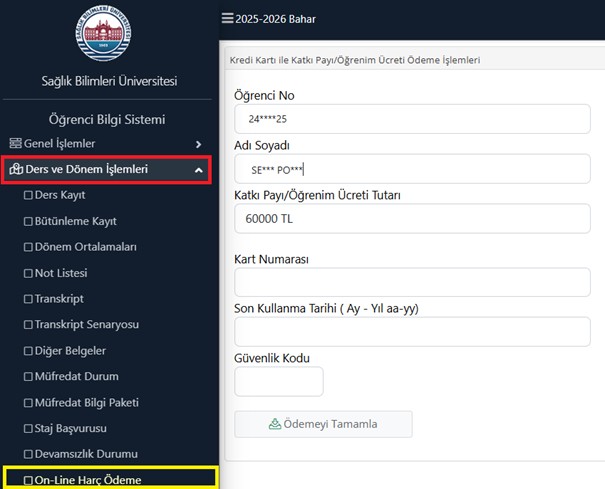
During the course registration period specified in the academic calendar, sign in to the Student Information System (SIS), open the “Course and Semester Procedures” menu, and select “Online Tuition Payment.” On the payment page, enter your card information to pay the amount due for the applicable semester.
If your bank offers an installment plan for education-related payments, you may arrange installments through your bank’s mobile application after completing the payment.